Last updated: November 19, 2026
Key Takeaways
- You already know the balance, first due date, and deferment interest rule.
- Model the deferred start date by moving the first payment and tracking any balance change first.
- Build the schedule in two stages: no-payment period first, repayment period after the start date.
- Interest during deferment may stay flat, grow monthly, or capitalize on the start date.
A debt payoff calculator for deferred payment start dates: how to model no-payment periods changes the math because the balance can grow before your first payment ever lands. Use the start date, the deferment length, and any interest charged during that no-payment period to build the payoff schedule. This article shows how to model that gap correctly.
What this covers, and who it fits
This applies if you have a debt with a delayed first payment, not a missed payment and not a plan that has already started. You already know the loan balance, the first due date, and whether interest accrues during the deferment. If the lender has changed the terms after you began paying, this page is not the right model.
It also helps if you want a debt payoff calculator that handles a deferred payment period without pretending the debt sat still for free. The math changes in the first month, sometimes in every month before repayment starts. That is the whole point.
This is information, not financial advice. Debt terms differ by lender, country, and contract, and a qualified adviser can help with your own situation. A debt payoff calculator for deferred payment start dates works best when the loan has a clear start date, an opening balance, and a known interest rule.
- You need a start date.
- You need the interest rate or the rule that says how interest is charged.
- You need the first real payment schedule date.
- You need to know whether the lender adds unpaid interest to principal.
If any of those are missing, the calculator can still estimate a range. It cannot produce a trustworthy payoff date.
How do I model a deferred payment start date?
A deferred payment start date is modeled by moving the first payment to the real start date, then letting the balance change during the no-payment period before amortization begins. That means the opening balance for the repayment schedule may be higher than the amount you borrowed. Here’s the catch: if interest accrues during deferment, the beginning balance is not the original balance.
Picture this: you have a loan that does not require payment until a future date, but the interest clock is still running. You need to decide what happens in each month before that first payment, then feed those numbers into the calculator in order. A good model shows the balance on the first payment date, not just the amount borrowed on day one.
Use a calculator that lets you enter a deferment period, a monthly interest rate, and the first payment date. If it only asks for the original principal and monthly payment, it will understate the payoff time whenever the balance grows before repayment starts.
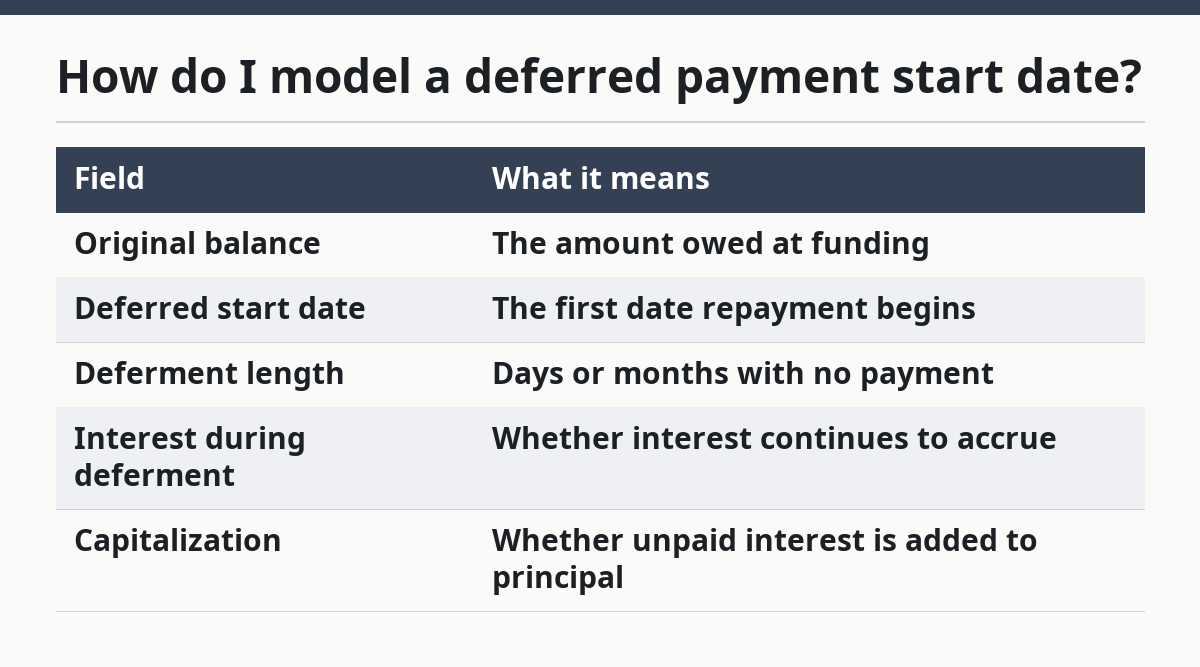
A simple model needs these pieces:
| Field | What it means |
|---|---|
| Original balance | The amount owed at funding |
| Deferred start date | The first date repayment begins |
| Deferment length | Days or months with no payment |
| Interest during deferment | Whether interest continues to accrue |
| Capitalization | Whether unpaid interest is added to principal |
If the calculator cannot handle capitalization, use a separate first-stage calculation for the no-payment period, then enter the new balance as the starting point.
Step-by-step: how to build the no-payment period into the calculator
A deferred payment schedule is built in two stages: the no-payment period first, then the repayment period after the start date. The key is to verify the balance at the handoff. If the handoff number is wrong, every payoff result after that will be wrong too.
-
Enter the original balance exactly as written on the statement. Use the opening principal, not the amount after fees unless the lender says fees are part of the loan balance. Verify the number against the contract or first statement. A mismatch here means the calculator starts from the wrong base.
-
Set the first payment date as the deferred start date. Use the calendar date, not “about three months from now.” Verify the date format your calculator uses, such as YYYY-MM-DD or MM/DD/YYYY. A problem shows up when the payment date shifts by one billing cycle.
-
Add the full deferment length. Use the exact number of days or months in the no-payment period. If the delay is 90 days, do not round it to 3 months unless the contract uses calendar months. A rounding error changes the interest count.
-
Apply the interest rule during deferment. If interest accrues daily, use a daily rate; if it accrues monthly, use the monthly rate. Verify whether interest is simple or compounds. A problem appears when the calculator assumes no interest but the lender charges it anyway.
-
Check for capitalization at the end of deferment. Capitalization means unpaid interest is added to the principal before repayment starts. Verify whether the contract says accrued interest will be capitalized on the first payment date. If it is not handled, the starting balance for repayment is too low.
-
Enter the repayment payment amount only after deferment ends. Do not start the regular payment in the no-payment window unless the contract requires partial interest payments. Verify that the first payment lands on or after the deferred start date. If the calculator shows a payment earlier than that, the schedule is wrong.
-
Review the beginning balance for the repayment phase. This should be the original balance plus any accrued and capitalized interest, minus any fees or payments made during deferment. Verify that the figure matches the lender’s statement on the first due date. If it does not, recalculate the deferment period first.
-
Run the payoff schedule from the first payment date forward. Check the number of months, the final payment, and the total interest after the start date. A problem often shows up as an impossible end date, which means the deferment balance was entered incorrectly.
A calculator that supports these steps is modeling the debt correctly. One that skips them is guessing.
What happens to interest during the deferment period?
Interest during deferment can stay flat, build each month, or be capitalized into the balance on the start date. That choice changes the payoff timeline more than the payment amount sometimes does. A 0% no-payment period is rare; many plans still let interest run.
Picture this: you are staring at a loan that says “no payment due until June,” and you are trying to figure out whether April and May are free months. The answer depends on the contract language. Some debts charge interest every day. Others freeze interest for the delay. A few add the unpaid amount later, which raises the balance before you make a single payment.
The clean way to model it is to separate three items:
- Accrued interest: interest that builds during the no-payment period
- Capitalized interest: accrued interest added to principal
- Beginning balance: the amount used when repayment starts
If your lender sends a statement showing interest through the day before the first payment, use that figure. If not, a calculator may need the annual rate and the exact number of deferment days to estimate accrued interest. This is especially important for student loans, promotional financing, and other balances that allow an initial grace period.
Use the contract’s wording if it names the rule. If the wording is unclear, treat the result as an estimate, not a final payoff plan, and consult a qualified professional or the lender before relying on it. That is safer than pretending the balance cannot change before the first payment.
A useful source for plain-language loan terms is the U.S. Consumer Financial Protection Bureau’s explainer on loan amortization and interest calculation. The Federal Reserve also publishes consumer-facing guidance on interest and loan costs.
What if I do not start paying right away?
A no-payment start does not mean the debt is paused in every sense. It means your repayment timeline starts later, and the balance may or may not grow before then. If the debt accrues interest during the wait, the calculator needs a larger opening balance on day one of repayment.
Picture this: you have a 60-day grace period before the first bill, and you want to know whether the final payoff date moves by 2 months or by much more. The answer depends on what happens to interest in those 60 days. If interest accrues daily, those two months are not free. If the lender capitalizes that interest, the debt grows before the first scheduled payment.
Use this checklist before trusting the result:
- Confirm whether the lender bills interest during the no-payment period.
- Confirm whether unpaid interest is added to principal.
- Confirm the exact first payment date, not just the month.
- Confirm whether the first payment is full principal-and-interest or only interest.
If the calculator cannot show these separately, it can still estimate, but it should not be treated as exact, and a lender statement or qualified professional should confirm the figures.
The mistakes that break the payoff math
A deferred start date is easy to model badly because the error often hides in the first month. The payoff schedule still looks neat, but the balance is off by the time the first payment arrives. That can shift the final payoff date and the total interest line.
Picture this: you enter a loan into a calculator, get a neat result, and never notice that the first payment was placed a month too early. The schedule looks tidy. The math is wrong. Small entry mistakes matter here because the no-payment period changes the opening balance.
Here are the errors that cause the most trouble:
- Treating deferment like a missed payment. That assumes a payment was due and skipped, which can trigger late-fee logic the contract does not use. The fix is to enter a true no-payment start date, and if the wording is unclear, consult the lender or a qualified professional.
- Ignoring interest during deferment. That leaves the beginning balance too low. The fix is to calculate or enter accrued interest before repayment starts, using the contract or lender statement as the source.
- Rounding the deferment length too loosely. “Three months” is not always the same as 90 days. The fix is to use the contract’s date rule and confirm it with the lender if needed.
- Skipping capitalization. That misses interest added to principal on the start date. The fix is to check whether the lender capitalizes unpaid interest and verify the treatment against the contract or statement.
- Starting the repayment payment too soon. That shortens the deferment on paper and distorts the payoff timeline. The fix is to place the first payment on the actual due date.
- Mixing up original balance and beginning balance. The repayment schedule should start from the amount owed at the end of deferment, not the funding amount. The fix is to use the post-deferment balance as the schedule base.
If the calculator cannot distinguish those pieces, use a spreadsheet or a lender statement instead.
When the standard calculator setup does not apply
A standard payoff calculator is not the right tool when the deferment is irregular, conditional, or tied to changing balances. Those cases need a different setup because the no-payment period is not a simple gap on the calendar. If the rules change midstream, a basic calculator will lie by omission.
Picture this: your debt has a start date, but it also has fees, variable interest, or a one-time capitalization rule that happens only under certain conditions. The standard model still works only if you can separate each event into a date and amount. If you cannot, the result is a rough estimate at best.
Use a different method when any of these apply:
- The interest rate changes during deferment. Model each rate period separately, or the payoff estimate will drift.
- Fees are added before the first payment. Include them in the opening balance on the start date.
- The deferment can end early. The calculator needs the real start date, not a planned one.
- There are partial payments during the no-payment period. Those reduce principal and interest differently than a full payment schedule.
- The debt has mixed rules for principal and interest. Split the balance into separate line items if the lender does.
A fixed-schedule calculator works best for one clean deferment, one interest rule, and one start date. Once the terms get messy, a month-by-month table is safer.
What a good result looks like
A good deferred-payment model shows two things clearly: the balance on the first payment date and the payoff date after payments begin. It does not hide the no-payment period inside a single monthly payment number. The schedule should make the gap visible.
Picture this: you open the calculator and can see the balance before repayment starts, the date the first payment hits, and the amount that interest adds during the wait. That is the standard to aim for. If the plan does not show those pieces, it is too vague to trust.
A sound result usually has these traits:
- The first payment date matches the contract.
- The opening repayment balance is higher than, equal to, or lower than the original balance based on the deferment rules.
- The total interest line changes when you lengthen or shorten the deferment.
- The payoff date moves when the beginning balance changes.
If you want a broader method for interest-heavy debts, the hub page on debt payoff calculators and hidden costs is the right next stop. This page only handles the start-date gap.
FAQ
What if i do not start paying right away?
The balance may still change before your first payment. If interest accrues during deferment, the amount owed on the start date can be higher than the original balance. The calculator needs that updated balance to produce a realistic payoff schedule.
How do i model a grace period?
Treat the grace period as a date range with no payments, then check whether interest still accrues inside it. If interest is charged, calculate or enter the accrued amount before the first payment date. If the lender capitalizes it, add it to principal on the start date, and confirm the treatment with the lender or a qualified professional.
Does delayed payment affect total interest?
Yes, if interest keeps running during the no-payment period. A later start date can raise the beginning balance, which can raise the total interest paid over the life of the debt. If the deferment is truly interest-free, the effect is different and often smaller.
Drafted with AI; not yet reviewed by a person.