Last updated: November 19, 2026
Quick Answer: A debt payoff calculator can help you compare payoff paths, but it is only a planning tool; in one common example, a $100 extra monthly payment can change the payoff timeline, while fees and fine print can still change the real cost. Debt payoff calculators and hidden costs are the point of this guide: they can show you the monthly payment, the payoff date, and the interest saved — but they often miss the fees, penalty traps, and cash-flow strains that change the real cost. This guide shows what those calculators do well, where they mislead, and how to read the results without fooling yourself.
I write about consumer debt and payoff methods, and this is information, not financial advice; for your own situation, a qualified adviser can help. For background on consumer-credit costs, see the CFPB on debt collection and payment issues and the FTC on debt-relief and fee risks.
Key takeaways
- A debt payoff calculator is a planning tool, not a promise.
- The biggest blind spot is usually not interest math — it is the costs the tool does not ask about.
- Balance transfer fees, prepayment rules, late fees, and skipped-emergency-fund costs can change the real payoff picture fast.
- The same calculator can point two people toward very different next steps because income, rate changes, and fee rules differ.
- The best use of a calculator is to compare payoff paths, then check the fine print on every account before you act.
What a debt payoff calculator actually tells you
A debt payoff calculator tells you how long a balance may take to disappear and how much interest you may pay under a set of assumptions. It is useful, but only as good as the numbers you put into it.
Picture this: you have three cards, a car loan, and a student loan, and you want one clean answer by tonight. A calculator can rank payoff methods, but it cannot know whether your card issuer charges a balance transfer fee, whether your loan has a prepayment penalty, or whether your budget can survive an extra payment every month.
That is the first trap. The tool assumes the future stays calm unless you tell it otherwise, and a qualified professional can help you test whether those assumptions fit your situation. The CFPB’s debt and credit guidance is a useful place to check terms before you rely on a result.
Most calculators ask for:
- current balance
- interest rate or APR
- minimum payment
- extra monthly payment
- payoff method, such as avalanche or snowball
Some also ask for one-time lump sums, payment frequency, or a start date. If a calculator does not ask about fees, grace periods, or loan terms, it is not “wrong” — it is just incomplete.
The truth is, the value of a calculator is in the comparison, not the number on the screen. A rough estimate is enough to show whether an extra $50, $100, or $300 a month changes the timeline in a meaningful way. A precise-looking date can still be wrong if the debt changes, the rate adjusts, or a fee gets added.
What it can estimate
- payoff date
- interest cost over time
- effect of extra payments
- ranking of payoff methods
What it cannot know
- future rate changes
- missed-payment fees
- transfer fees
- collection costs
- your emergency needs
That gap is where hidden costs live.
Which payoff method does the calculator compare?
A debt payoff calculator usually compares at least two methods: the debt avalanche and the debt snowball. The avalanche usually wins on total interest; the snowball can win on motivation for some people.
Picture this: you are staring at a small card balance and a much larger high-rate balance. The calculator says the avalanche saves more interest, but the snowball gets a balance off your list sooner. Those are different wins, and the difference matters.
Here is the plain version:
- Avalanche: extra money goes to the highest-rate balance first.
- Snowball: extra money goes to the smallest balance first.
The avalanche is the math-first choice. If rates stay as entered and you keep paying on schedule, it usually cuts interest faster than the snowball. That matters most when balances are large or rates are wide apart.
The snowball is a behavior-first choice. It can help a person who needs early wins to stay consistent, because one account disappears sooner. A calculator may show a slightly higher interest total, but it may also show a steadier path for someone who has struggled to keep paying after the first hard month.
The hidden cost here is not just dollars. It is dropout risk. A method that looks less efficient on paper can still make sense if it helps a person avoid falling back into late fees, returned-payment fees, or new borrowing.
A good calculator should let you compare both methods side by side. If it only shows one path, it is doing too much thinking for you.
Use avalanche when:
- you can stay consistent without early wins
- you have high-rate debt
- you want the lowest interest cost under the model
Use snowball when:
- you need visible progress fast
- your budget is tight and morale matters
- you are likely to quit without a quick win
What hidden costs do debt payoff calculators miss?
A debt payoff calculator often misses the exact costs that make debt payoff feel harder than the spreadsheet says. Those costs are real, and some are buried in account terms, not in the monthly minimum.
Picture this: you enter your balances, hit calculate, and see a neat payoff date. Then you read the statements and find a balance transfer fee, a deferred-interest clause, and a late fee from last month. The calculator never warned you because it never saw those lines.
The most common hidden costs are these:
-
Balance transfer fees
A lower-rate or 0% transfer can still cost a fee on the amount moved. If you do not include that fee, the tool can make the transfer look better than it is. -
Prepayment penalties
Some loans, especially certain older or specialized ones, can charge a fee for paying early. Many consumer loans do not, but you must check the contract rather than assume. -
Late fees and return fees
One missed or bounced payment can erase part of the savings from a clever payoff plan. -
Deferred interest
A promotional offer can look cheap until the promo ends. If the balance is not cleared by the deadline, interest may be charged in a way that hurts the plan. -
Cash-flow strain
A calculator may say “send $200 extra,” but that extra payment can create overdrafts, force new borrowing, or wipe out the money you need for repairs. -
Opportunity cost of no emergency buffer
If every spare dollar goes to debt and a car repair hits, the result can be fresh debt on a new account.
The key point is honest: the cheapest-looking payoff plan is not always the cheapest real plan. Fees and cash-flow shocks can make a tidy calculation look optimistic.
A strong calculator cannot fix that by itself. You need to add the missing costs manually.
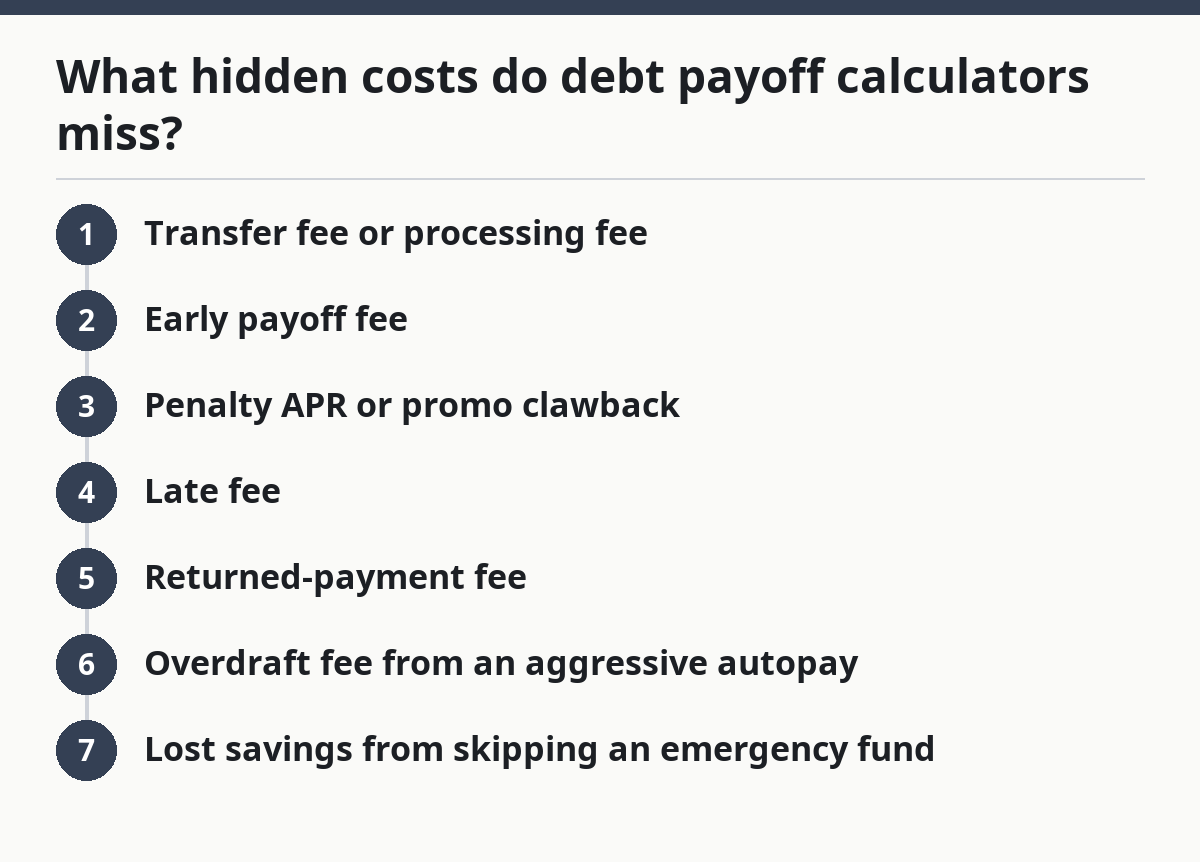
Common hidden costs to check
- Transfer fee or processing fee
- Early payoff fee
- Penalty APR or promo clawback
- Late fee
- Returned-payment fee
- Overdraft fee from an aggressive autopay
- Lost savings from skipping an emergency fund
How hidden costs change the math
Hidden costs change the math in two ways: they raise the total payoff cost, and they can change which payoff method makes sense. That is why a calculator result should be treated as a first draft, and a qualified financial professional can help you confirm the numbers for your situation. The CFPB and FTC both caution consumers to read terms closely before acting on debt offers.
Picture this: two debt paths both say “pay off in about the same time.” One path includes a fee to move the balance, while the other keeps the current rate but avoids the fee. The calculator can miss that trade-off unless you build it in.
Here is a simple way to think about it. If a payoff method saves interest but adds fees, you need to compare the saved interest against the new cost. If the fee is larger than the interest saved, the move may not help on net. If the fee is smaller, the move may still help, but only if you can also keep up with the new payment plan.
That does not mean every fee is a dealbreaker. It means the fee belongs in the decision.
Use this quick checklist before trusting a result:
- Add any balance transfer fee to the starting cost.
- Check whether the new rate lasts long enough for the balance to be paid off.
- Look for a promo end date and any rule that triggers retroactive interest.
- Confirm whether extra payments go to principal or get held for the next billing cycle.
- Check for autopay problems if you are moving accounts.
The truth is, a calculator is best at comparing clean scenarios. Real debt rarely stays clean.
Example of what changes
If you move a balance to save interest, the fee can reduce that benefit.
If you pay a little extra each month, the payoff date may improve.
If the transfer causes a missed payment or a late fee, the whole calculation can fall apart.
That is why the right question is not “What does the calculator say?” It is “What did the calculator leave out?”
Should you trust the payoff date the calculator gives you?
You can trust the payoff date as a model, not as a promise. It is useful if your payments, rates, and fees stay stable, but real life often changes the finish line.
Picture this: you open the calculator on a Sunday, feel motivated, and see a debt-free date that looks close enough to matter. Then a rate changes, a medical bill lands, or your overtime disappears. The date was never a contract. It was a forecast.
A payoff date becomes less reliable when:
- the rate is variable
- your income changes
- you carry multiple balances with different terms
- you rely on one-time bonuses
- you are considering a transfer or consolidation
- you do not have a buffer for emergencies
The date is still useful, because it helps you compare “extra $25,” “extra $75,” and “extra $150” in a way that is easy to understand. It shows direction. It does not guarantee arrival.
This matters because some readers treat a calculator like a deadline machine. They stop questioning the assumptions once the date looks neat. That is dangerous in personal finance, where one fee or one missed payment can turn a helpful plan into a more expensive one.
A better habit is to re-run the calculation whenever one of these changes:
- APR changes
- minimum payment changes
- you add a lump sum
- you miss a payment
- you use a balance transfer
- your budget changes by more than a little
If the calculator cannot be updated easily, it is less useful. You want something you can revisit, not a one-time answer.
Which hidden costs matter most on credit cards, loans, and transfers?
The hidden cost that matters most depends on the debt type, and that is where generic articles usually stay vague. Credit cards, personal loans, auto loans, and balance transfers do not fail in the same way.
Picture this: one account is a card with a promo rate, another is a personal loan with fixed payments, and a third is a car note. The calculator treats them like numbers, but the contract behind each balance is different. A qualified adviser can help you sort which terms matter most, and the FTC’s consumer advice on credit and debt can help you check the basics.
Credit cards
With credit cards, watch for variable APR, late fees, returned-payment fees, and promo expiration rules. A calculator that ignores the promo end date can understate the real cost of carrying a balance.
Credit cards also punish timing mistakes. A payment that lands late, even by a little, can trigger fees and raise the cost of the plan. If you use a transfer card, the transfer fee may matter as much as the rate reduction.
Personal loans
Personal loans often have fixed schedules, which makes them easier to model. The catch is that you still need to check for prepayment language and any fee for early payoff. If there is no early-payoff fee, a calculator can be fairly accurate here.
The problem is not usually hidden math; it is missed contract language.
Auto loans
Auto loans can have different rules about extra principal payments, and some borrowers assume every extra dollar cuts the balance immediately. That is not always true if the servicer applies it differently than you expect.
If you are paying extra on an auto loan, confirm whether the payment goes to principal and whether any payment instructions must be followed exactly.
Balance transfers and consolidation
These are where hidden costs show up loudest. The fee to move the balance, the length of the promo window, and the rate after the promo all change the result.
A calculator may show a lower monthly payment and a faster payoff path, but if the promotion ends before the balance is gone, the later cost can be much worse than the first-month savings looked.
Debt type vs. hidden cost
- Credit cards: fees, promo expiration, variable APR
- Personal loans: prepayment terms, payment allocation
- Auto loans: payment posting rules, extra principal handling
- Transfers/consolidation: transfer fee, promo window, reset rate
How to use a calculator without fooling yourself
Use the calculator twice: once with the clean numbers, and once with the hidden costs added. That simple habit catches a lot of false confidence.
Picture this: you are tempted to choose the result with the shorter payoff date and lower interest total. Instead, you run a second version that includes the transfer fee, the late-fee risk, or the lost cushion in your checking account. Now the decision is real.
Start with the numbers you know:
- balance
- APR
- minimum payment
- extra payment
- due date
Then add the costs that do not fit neatly into the calculator:
- transfer fees
- early payoff fees
- expected late fees if your budget is tight
- a buffer for emergencies
- any promo expiration risk
A useful rule is to ask, “What happens if this plan breaks once?” If one missed month would wreck the benefit, the plan is too brittle.
A second rule: do not use all spare cash if that leaves you with no room for repairs or timing mistakes. A payoff plan that causes repeated overdrafts can become more expensive than a slower plan that stays on track.
You can also stress-test the result:
- What if the APR rises?
- What if your extra payment drops by half?
- What if you need to pause for a month?
- What if the transfer fee is larger than expected?
- What if the promo ends two months before payoff?
If the plan survives those questions, it is sturdier. If it fails fast, the calculator was flattering you.
The best part? You do not need perfect math. You need honest math.
What should you check in the fine print before relying on a payoff plan?
Check the account terms before you rely on the payoff plan, because the fine print can change the whole cost picture. This is where a lot of hidden costs hide.
Picture this: you think your debt is straightforward. Then you find a clause about how extra payments are applied, or a balance transfer rule that excludes certain charges, or a fee schedule that changes the total cost of moving the debt.
Here are the lines worth reading first:
- how interest is calculated
- whether the rate is fixed or variable
- whether extra payments go to principal
- whether there is a prepayment penalty
- whether a promo rate ends on a fixed date
- whether fees are charged for transfers, late payments, or returned payments
If the account is a credit card, read the section on promotional APR and fee schedules. If it is a loan, look for early repayment language and payment allocation rules. If it is a transfer offer, verify the transfer deadline, the promo duration, and the post-promo rate.
You do not need to decode every legal phrase. You do need to find the parts that affect money movement. A calculator cannot read the contract for you.
A useful habit is to put the key terms in one note:
- current APR
- fee amount
- promo end date
- minimum payment
- extra payment plan
- payment method used
Then compare that note to the calculator result. If the result and the contract disagree, trust the contract.
When is a debt payoff calculator not enough on its own?
A debt payoff calculator is not enough on its own when the decision depends on more than interest math. That happens more often than people think.
Picture this: you are deciding between paying debt faster, keeping cash in reserve, or moving balances to a new offer. The calculator can rank the numbers, but it cannot tell you how much stress your household can absorb.
The tool is not enough when:
- you have irregular income
- your emergency savings is tiny or absent
- the debt has complex terms
- you are considering a transfer with a deadline
- your budget already runs too tight
- your payments have bounced before
In those cases, the hidden cost is often the next surprise. A plan that drains every spare dollar can leave you one repair away from new debt. A plan that stretches too far can also cause late fees and make the payoff slower, not faster.
This is also where a person may need outside help. A credit counselor, a qualified financial adviser, or another trusted professional can help sort the terms and the budget if the situation is messy or high stakes. That is not because calculators are useless. It is because some cases have too many moving parts for a simple tool.
If the debt is simple and your income is stable, a calculator is enough to start. If the numbers live inside a pile of fees, deadlines, and thin cash flow, the calculator is only step one.
FAQ: Common questions about payoff calculators and hidden costs
Do debt payoff calculators include fees?
No, many do not. Most calculators focus on balance, APR, minimum payment, and extra payment, so transfer fees, late fees, and prepayment penalties may be missing unless you add them yourself.
Is the avalanche always better than the snowball?
No, not always. Avalanche usually saves more interest on paper, but snowball can work better for someone who needs an early win to stay on plan. The right choice depends on what keeps you paying.
Can a balance transfer make debt cheaper?
It can, but not automatically. A lower rate only helps if the transfer fee, promo length, and post-promo rate still leave you ahead after the math is done.
What hidden cost gets missed most often?
The most common miss is usually a fee or rule tied to the account contract. That can be a transfer fee, a late fee, a promo expiration clause, or a payment-posting rule that changes how fast principal falls.
Should I trust a payoff date from a calculator?
Trust it as a forecast, not a promise. It is useful for comparison, but changes in rate, income, fees, or payment timing can move the finish line.
The bottom line
A debt payoff calculator is a useful map, not the territory. It can show you the broad shape of the road, but the hidden costs are the potholes, tolls, and detours that change the trip.
Picture this: you are trying to get out of debt without making the same mistake twice. The calculator helps you compare paths. The fine print tells you which path is actually cheaper.
Use the tool for what it does well:
- compare payoff methods
- estimate interest
- test extra payments
- set a target date
Then check the costs it does not know:
- transfer fees
- late fees
- prepayment terms
- promo expiration
- cash-flow strain
That is the whole game. The best payoff plan is the one that still works after the hidden costs show up.
Drafted with AI; not yet reviewed by a person.