Last updated: November 20, 2026
Quick Answer: compare two debt payoff scenarios by lining up the same debt balances, same interest rates, and the same start date in a debt payoff calculator, then check 3 things: total interest cost, payoff date, and the size of each extra payment. How to compare two debt payoff scenarios in a calculator before you commit is about seeing which plan fits your budget and which one finishes sooner.
Key takeaways
- Use the same starting balances in both scenarios or the comparison is distorted from the start.
- Compare at least two outcomes: how much interest each plan costs and when the debt is gone.
- A lower monthly payment can hide a much longer payoff date.
- Extra payments only mean something if the calculator applies them the same way in both plans.
- The “better” scenario depends on cash flow, not just the smallest interest total.
What does a fair comparison need?

A fair comparison needs the same debt list, the same interest rates, and the same date you begin paying. How to compare two debt payoff scenarios in a calculator before you commit only works if both versions start from the same facts; otherwise the calculator is comparing two different problems, not two real choices.
The reader usually already has a debt payoff calculator open, a list of balances, and a rough idea of the extra payment amount. The main assumption is that the debts are fixed enough to model for at least 1 month without changing the balance, rate, or required minimum payment. If the plan includes variable-rate debt, a balance transfer, or a lump sum that is not certain, the comparison still works, but the result is only a snapshot.
The point is to see how much interest cost changes, how the payoff date moves, and how much monthly breathing room each plan leaves. A plan that saves money but leaves you unable to make the payment for 6 months is not a better plan.
For a deeper overview of the tools behind this process, the cluster guide on debt payoff calculators and modeling belongs on the same shelf as this page. This page focuses on the comparison step only.
How do I compare two payoff options?
Compare two payoff options by entering one scenario, recording the result, then changing only one variable and recording that result too. The calculator should tell you the payoff date, the interest cost, and the payment schedule for each version.
-
Open the debt payoff calculator and enter every debt balance, APR, and minimum payment for Scenario A. Keep the start date the same for both scenarios, usually the day you begin the plan. Verify that every balance matches your statement; if one balance is off by even $1, the payoff date and interest cost can shift.
-
Set the extra payment for Scenario A to the exact amount you can send beyond the minimum. If the extra payment is meant to go only to one debt, check that the calculator applies it there and not across all debts. A problem shows up when the calculator spreads the extra payment in a different order than your plan.
-
Record the payoff date from Scenario A before changing anything else. Write down the month and year, not just the number of months. If the calculator does not produce a clear payoff date, the result is hard to compare and easy to misread.
-
Record the total interest cost from Scenario A. This is the extra money paid above principal over the life of the plan. Verify that the calculator labels it clearly; if it mixes fees, interest, and principal in one line, the comparison is not clean.
-
Change one variable only for Scenario B, such as raising the extra payment, changing the order of debts, or switching which debt gets the extra payment first. Keep the same debt list, same rates, and same starting balances. If more than one thing changes, you cannot tell which change caused the difference.
-
Record the payoff date and interest cost for Scenario B. Compare those two numbers directly against Scenario A. A problem exists if Scenario B lowers the payment but extends the payoff date so far that the plan no longer fits your budget.
-
Compare the monthly cash flow in both scenarios. If one plan needs an extra payment of $75 and the other needs $125, the lower-cost plan may still be the better fit if cash is tight. The right comparison is not only which plan is cheaper, but which plan can be followed for the full term.
-
Check the debt order and final balance at the end of each schedule. The last debt should end near $0, with only a tiny rounding difference if the calculator uses cents. If the ending balance is off by a meaningful amount, the calculator assumptions or payment order need another look.
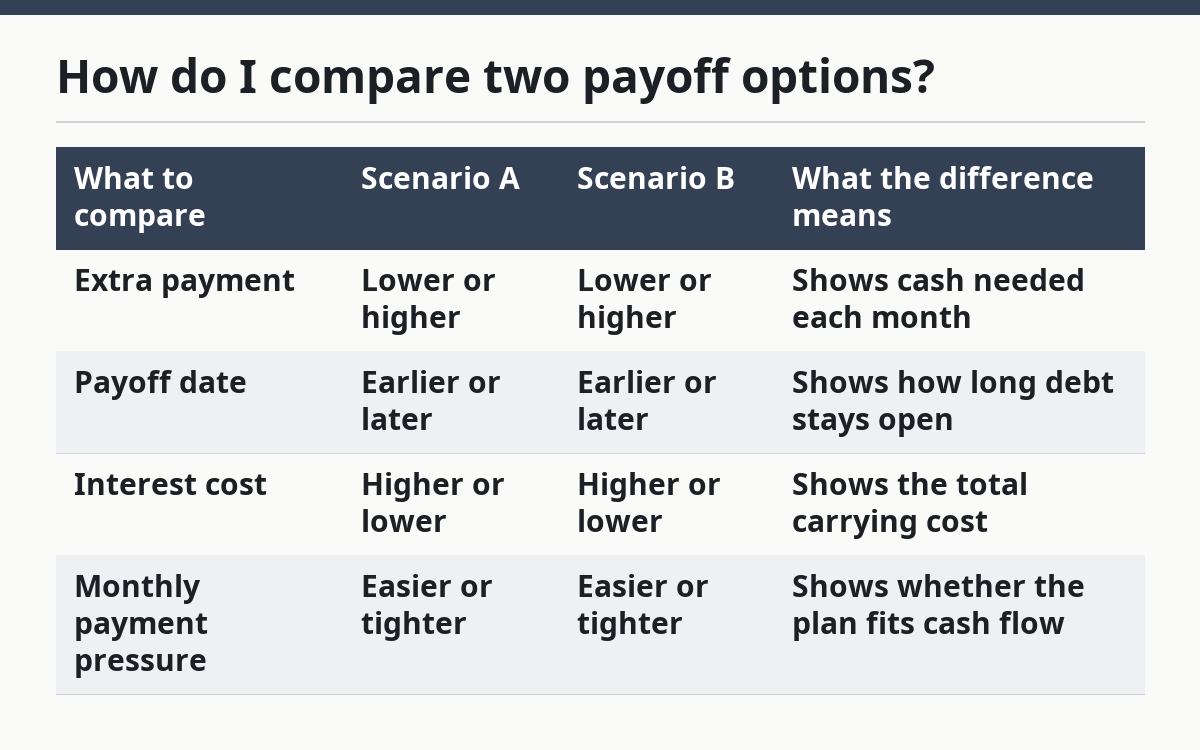
A useful comparison usually comes down to a simple pattern: one scenario cuts interest cost, another shortens the payoff date, and a third keeps the payment more manageable. The calculator makes those trade-offs visible in 1 screen.
| What to compare | Scenario A | Scenario B | What the difference means |
|---|---|---|---|
| Extra payment | Lower or higher | Lower or higher | Shows cash needed each month |
| Payoff date | Earlier or later | Earlier or later | Shows how long debt stays open |
| Interest cost | Higher or lower | Higher or lower | Shows the total carrying cost |
| Monthly payment pressure | Easier or tighter | Easier or tighter | Shows whether the plan fits cash flow |
Which numbers matter most?

The numbers that matter most are the payoff date, the interest cost, and the extra payment amount. A calculator can show other fields, but those three usually decide whether a scenario is practical.
Interest cost matters because it shows the price of carrying debt for longer. The payoff date matters because a shorter plan may free up cash sooner, even if the monthly payment is a little tighter. The extra payment amount matters because a plan that looks good on paper fails fast if the payment is too steep to keep sending every month.
Minimum payment alone is not enough to judge a scenario. Minimums can make a budget look comfortable while stretching debt over a much longer timeline. A scenario that looks “cheaper” each month may still cost more overall because the balance sits there for a longer period.
This is where scenario assumptions matter. If the calculator assumes no new charges and no missed payments, it gives a cleaner comparison than real life often allows. That does not make it wrong; it means the result is a planning model, not a promise.
For current consumer guidance on debt and budgeting basics, the Consumer Financial Protection Bureau and the Federal Trade Commission both publish plain-language material on debt management and repayment planning. Their guidance is useful for definitions and caution, but not for your exact numbers.
What mistakes change the result?
The biggest mistakes are changing more than one thing at once, using mismatched starting balances, and ignoring how the extra payment is applied. Each one can make a scenario look better or worse than it really is.
- Changing the rate and the extra payment at the same time: This hides which change saved money. The correct move is to alter one variable, then compare the result.
- Starting one scenario from an old balance: This makes the payoff date and interest cost meaningless. The correct move is to refresh all balances on the same date.
- Leaving out a debt: This can make the monthly payment look lower than it really is. The correct move is to enter every debt that the plan will actually cover.
- Assuming the calculator applies extra payments the same way you do: Some tools attack the highest rate first, while others follow a chosen order. The correct move is to verify the payoff order before trusting the output.
- Reading only the monthly payment: A lower payment can mean a longer debt life and more interest. The correct move is to compare the full schedule, not just the first month.
- Ignoring rounding: Small rounding differences can leave a tiny ending balance or a final payment that looks odd. The correct move is to check that the ending balance is close to zero, not a large leftover amount.
The cleanest comparison is boring: same inputs, one change, same calculator, same start date. That discipline matters more than any fancy chart.
When should you stop and rethink the setup?
Stop and rethink the setup when the plan depends on facts that are not stable for the full period. A comparison is only useful if the assumptions are close enough to real life.
Variable interest rates are changing soon: the payoff date and interest cost may shift after the change — rerun the scenario with a new rate, or ask a qualified adviser how the change affects your plan.
You plan to make a lump sum but do not know when: the scenario may look stronger than it is — run one version without the lump sum and one with it as a separate what-if case.
The calculator does not show the payoff order: you cannot verify how the extra payment is being used — pick a different tool or a spreadsheet that makes the order visible.
The extra payment would strain your monthly budget: the scenario may save interest but fail in practice — lower the extra payment and compare again before committing.
Your debts have fees, promotions, or special terms: the simple calculator may not capture the whole cost — check the card or loan terms and get qualified help if the structure is unusual.
A standard debt payoff calculator is the right tool for fixed balances, ordinary APRs, and a clear extra payment. It is the wrong tool when the plan depends on uncertain cash, changing rates, or terms the calculator cannot model.
How do I know which scenario is better?
The better scenario is the one that fits your budget and gives the trade-off you care about most. If the goal is the lowest interest cost, choose the plan with the smaller total interest, as long as the payment is realistic. If the goal is speed, choose the shorter payoff date, but only if the extra payment can keep going.
A reader comparing two debt payoff scenarios should not try to crown a universal winner. One plan may save more interest but require a payment that is hard to sustain. Another may cost a little more but leave enough cash for the rest of the month. In personal finance, the plan that survives 12 months often beats the plan that looks best on day 1.
That is why the comparison should end with one question: which scenario can be followed without breaking the rest of the budget? If the answer is unclear, the extra payment is probably too aggressive and the setup needs another pass.
Can I compare more than two scenarios?
Yes, and sometimes 3 versions show the real choice better than 2. A common setup is a baseline plan, a moderate extra payment plan, and an aggressive extra payment plan.
The key is to keep the same debt list and the same start date across all 3. Then change only one thing in each version, such as extra payment size or payoff order. That makes the comparison easier to read because each scenario answers a different question: what happens if nothing changes, what happens with a small push, and what happens with a bigger push.
If the calculator gets cluttered, compare the scenarios one at a time and write the payoff date and interest cost beside each one. A simple note on paper can be easier to trust than a screen full of charts.
How do I compare payoff options?
Compare payoff options by holding the debt list steady and changing only one payment rule at a time. The useful numbers are the payoff date, the interest cost, and the monthly payment required to keep the plan going.
If those 3 numbers move in the same direction, the choice is usually clear. If they move in opposite directions, the trade-off is real and the decision comes down to budget and priority.
Which payoff scenario saves more money?
The scenario with the lower total interest cost saves more money on paper. That only matters if the payment is realistic for the full period.
A plan that saves a little more interest but falls apart after 4 months is not the better plan. The better plan is the one that can actually finish.
Can I compare two debt plans side by side?
Yes, and side-by-side comparison is one of the clearest ways to spot the trade-off. Put the same balances, rates, and start date into both versions, then line up payoff date, interest cost, and extra payment amount.
If the calculator does not show them side by side, make a small table yourself. That makes the difference between the two plans obvious in less than 1 minute.
Drafted with AI; not yet reviewed by a person.