Last updated: November 20, 2026
Quick Answer: Use the payment date the lender actually credits, then compare it with the date you sent it; if the payment posts late, the payoff timeline can shift by days or even a month. That is the core method for how to use a debt payoff calculator when payments are applied late in the month. For late or disputed posting dates, review the loan agreement or account records and, if needed, consult a qualified professional or the servicer directly. See the CFPB’s guidance on understanding loan statements and payment posting rules and the FTC’s guidance on debt management for context. CFPB FTC
Key takeaways
- A late-posted payment changes the calculator only when the tool uses posting date, not just payment amount.
- The debt payoff calculator should reflect the servicer posting date, the minimum payment, and when interest accrues.
- A 1-day delay and a 10-day delay can produce very different payoff timelines if the balance keeps accruing interest in between.
- The cleanest model is usually two runs: one with the payment date you intended, one with the date the lender actually applied it.
- If the account uses a statement cycle that closes before the payment posts, the calculator may need a separate month-by-month adjustment.
What does payment posting delay mean here?

A payment posting delay means the lender or servicer credits your payment after the day you sent it. In a debt payoff calculator, that delay matters because the balance may keep accruing interest until the posted date, and the minimum payment may still count as unpaid if it arrives after the due date. The CFPB notes that loan statements and account records should be checked carefully when dates matter. CFPB
This is not the same as the date you clicked “pay” or mailed a check. A card issuer, loan servicer, or other creditor can use a posting date that is later than your payment date, and the statement cycle can make that timing even more important. The central question is simple: which date does the calculator use as the real reduction in balance?
Who should use this method?
This method fits people who already know their balance, minimum payment, and payment schedule, and who want to model a late-month payment more accurately. It also fits anyone using a debt payoff calculator as part of a debt snowball or debt avalanche plan, because both methods depend on the order and timing of payments. See the related guides on debt snowball calculators and debt avalanche calculators.
It is less useful if the account has changing fees, skipped payments, or a lender that changes allocation rules often. It is also a weak fit if you do not know the servicer posting date or if the account has been sold, transferred, or placed in a special status. In those cases, the calculator can still help, but only as a rough estimate.
How do you model a late-posted payment in a debt payoff calculator?

You model a late-posted payment by entering the posted date, not the send date, and then checking how that shifts interest and payoff timing. Start with the debt payoff calculator you already use, then make the timeline match the lender’s records as closely as possible.
- Open the debt payoff calculator and enter the current balance, the minimum payment, and the interest rate exactly as shown on the latest statement; verify the statement date and look for a mismatch if the calculator asks for monthly or yearly interest, because a wrong rate format will distort every month after the first.
- Set the payment date in the debt payoff calculator to the servicer posting date, not the day you mailed or scheduled the payment; verify the date on the payment confirmation or transaction history, and flag any gap of 1 day or more between sent and posted dates because that gap is the delay you are modeling.
- Add the minimum payment in the debt payoff calculator on the due date used by the lender, if the tool allows due-date entry; verify whether the minimum payment was credited before the statement cycle closed, because a payment posted after that cycle may not reduce that cycle’s reported balance the way you expect.
- Run the debt payoff calculator once with the posted date and once with the earlier date you intended; verify whether the payoff month, total months, or remaining interest changes, and, if the numbers do not match your statement, consult the servicer or a qualified financial professional before relying on the result.
- Check interest accrual in the debt payoff calculator for the days between send date and posting date; verify whether the tool compounds daily, monthly, or by statement cycle, because interest accrual timing is the main reason a late payment changes the result.
- Compare the debt payoff calculator result to the statement cycle and note whether the payment landed before or after the closing date; verify the cycle close date on the statement, because a payment posted after that date may move the payoff one cycle later even if it was only late by a few days.
- Repeat the debt payoff calculator with the same payment amount but move the posting date by 1 week if you want to stress-test the schedule; verify whether the extra delay changes the order of debts in a snowball plan, and, if the lender’s rules are unclear, confirm the allocation logic with the servicer before treating the result as exact.
- Save both debt payoff calculator outputs so you can compare them side by side; verify that each version clearly labels the date assumption, because unlabeled scenarios make it easy to mix up a sent date with a posted date later on.
The key point is that the calculator should answer the question, “When did the balance actually go down?” If the answer is later than you first thought, the payoff date moves with it. That is normal, and it is why a payment posting delay belongs in the model instead of being ignored.
What should I check before I trust the result?
I should check the lender’s statement cycle, the posting date, and the way the calculator handles interest before I trust the result. Those three items matter more than a small difference in payment amount when the payment lands late in the month. The CFPB’s loan-statement guidance and the FTC’s debt guidance both support checking account records before making repayment decisions. CFPB FTC
A good check is to compare the lender’s confirmation page, the monthly statement, and the calculator output. If the statement shows the payment after the cycle close date, the calculator may need the later date even if the payment was initiated earlier. If the tool assumes same-day credit, it will usually understate interest for that month.
One useful standard is to make sure every date in the model matches one record: sent date, posted date, due date, and cycle close date. If two of those dates collapse into one entry, the result can look cleaner than it really is.
When should I stop using the calculator alone?
I should stop using the calculator alone when the account’s timing rules are no longer simple. In those cases, the calculator can still help frame the question, but it cannot stand in for the account records.
The payment was reversed or returned: the balance may not drop at all, or it may drop and then rise again — check the lender record before treating the payment as applied, and consult the servicer or a qualified professional if the reversal is unclear. CFPB
The account is in a special status: deferment, forbearance, or a hardship plan can change how interest accrues — use the servicer’s written terms, not the standard calculator flow, and confirm the status before modeling payoff timing. CFPB
The statement cycle closed before the payment posted: the payoff timeline may shift by a full cycle — rebuild the model from the next statement date, and check the monthly statement before assuming the payment counted in the earlier month.
The lender applies payments in a fixed order: some accounts apply money to interest, fees, then principal — the calculator must match that allocation delay or the payoff estimate will be too optimistic, so verify the order with the servicer if it is not obvious.
The interest rate can change soon: a variable rate or promotional rate ending on a known date can alter the result — the calculator should use separate periods, not one flat rate, and the account terms should guide the setup. CFPB
You do not know the posting date: the whole model rests on the wrong input — get the transaction history or monthly statement first, and consult the servicer if the record is incomplete.
If any of those apply, the calculator is still useful as a rough map, but it should not be treated as a precise timeline unless you verify the account records or get professional help.
What mistakes change the payoff date the most?
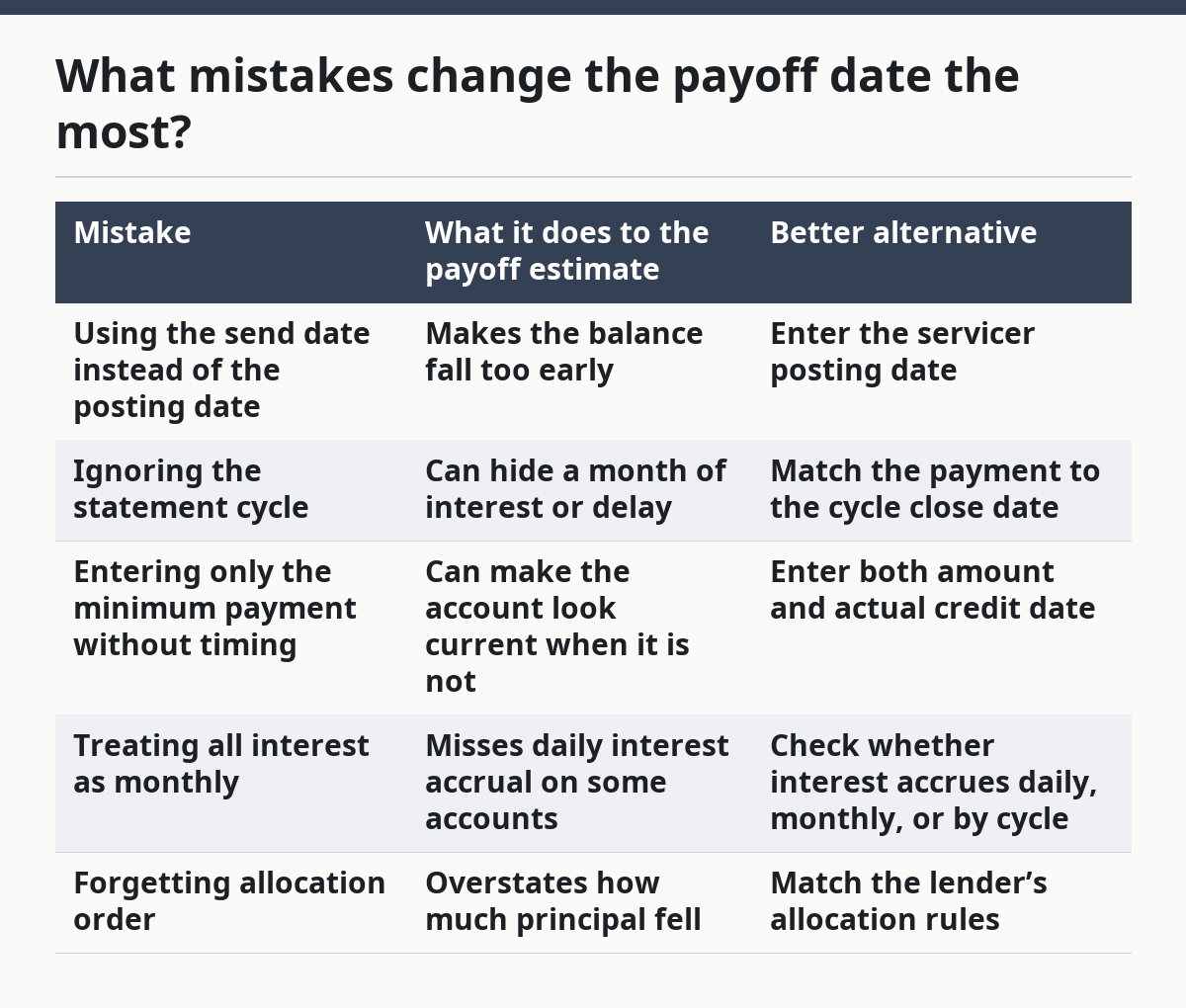
The biggest mistakes are usually about timing, not math. A debt payoff calculator can be perfectly built and still give the wrong answer if the inputs use the wrong date or the wrong cycle.
| Mistake | What it does to the payoff estimate | Better alternative |
|---|---|---|
| Using the send date instead of the posting date | Makes the balance fall too early | Enter the servicer posting date |
| Ignoring the statement cycle | Can hide a month of interest or delay | Match the payment to the cycle close date |
| Entering only the minimum payment without timing | Can make the account look current when it is not | Enter both amount and actual credit date |
| Treating all interest as monthly | Misses daily interest accrual on some accounts | Check whether interest accrues daily, monthly, or by cycle |
| Forgetting allocation order | Overstates how much principal fell | Match the lender’s allocation rules |
A smaller but common error is assuming a one-day delay never matters. It sometimes does and sometimes does not, depending on the balance, rate, and how the lender posts payments. The calculator should show that difference, not smooth it away.
What if the payment lands after the due date?
If the payment lands after the due date, the calculator should show both the timing delay and any extra interest that accrues before posting. That does not mean the payment failed, but it can change the month the balance drops and, in some cases, the order of debts in a snowball plan. The CFPB’s account-statement guidance is useful here because due dates and posting dates are not the same thing. CFPB
The right adjustment is to move the payment to the actual posting date and then compare it with a second scenario that assumes on-time posting. This gives a clean view of the delay without pretending the lender posted the payment earlier than it did. If the lender posts it several days late, the interest effect grows with the size of the balance and the length of the delay.
What does a good result look like?
A good result is one that matches the lender’s records closely enough to explain a statement. It should show the same payment month, the same balance trend, and a payoff date that changes only when the posting date changes.
That kind of result does not need to be exact to the day to be useful. It needs to make the timing assumptions visible. If the calculator hides those assumptions, it is not telling you enough about the debt. If it labels the posting date, interest rule, and statement cycle clearly, it is doing its job.
For a broader view of payoff modeling, the hub on debt payoff calculators and modeling is the right next stop. See also the related pages on debt snowball calculators and debt avalanche calculators.
FAQ
Does payment posting date affect payoff time?
Yes. Payment posting date affects payoff time because the balance usually stops accruing interest only when the payment is actually credited. If the payment posts several days late, the calculator should move the reduction to that later date, which can push the payoff timeline back.
What if a lender posts my payment several days late?
If a lender posts your payment several days late, the calculator should use that later date and not the date you initiated the payment. That can change the month of payoff and the amount of interest shown for that cycle. The size of the change depends on the balance, the interest rate, and the lender’s posting rules.
How do I estimate payoff if payments are applied after the due date?
Estimate payoff by running the debt payoff calculator with the actual posting date, then run it again with the intended due date. The difference between the two results shows the effect of the delay. If the account uses daily interest accrual or a statement cycle close to the due date, the gap can matter more than it first appears.
Drafted with AI; not yet reviewed by a person.